


Quick Answer: What is an AI employee?
An AI employee is an AI agent, or a group of agents, assigned an ongoing business role. It works from a clear brief, uses approved tools, and reports to a human owner. For marketing teams, that might mean checking campaign health, preparing lead-quality reports, or flagging customer issues. The term describes how a business manages the work; it is not a formal technical category.
Imagine giving an agent a standing job: check active Meta campaigns every hour and flag problems worth a marketer’s attention. Instead of waiting for someone to open Ads Manager, it runs on a schedule, collects evidence, and recommends a next step.
That is the idea behind an AI employee. The useful change is an ongoing role with clear triggers and permissions. Some assistants and copilots can also work proactively, so the label alone tells you little about what a system can do.
Why AI employees matter for marketing teams
Most marketers already know which work deserves attention. Campaigns need checks, prospects need follow-up, and customer messages need replies. However, keeping up across every channel is hard.
For example, an ad account keeps spending while the team is in meetings. A campaign may deliver cheap leads for days before anyone notices that few become customers. Meanwhile, reports often show each channel separately, hiding problems across the acquisition funnel.
An AI employee can help cover regular checks and prepare the first round of analysis. As a result, marketers can spend more time testing offers, improving creative, and talking to customers. That benefit depends on useful output, not simply running more tasks.
OpenAI’s guidance on workspace agents describes three core parts: a trigger, a process, and tools. These provide a practical starting point for work that repeats and needs information from other systems.
AI agent vs. digital worker vs. AI employee
These terms overlap. To make them useful, ask whether you are describing the technology, the work, or the role.
The same system can fit all three descriptions. For instance, an agent may analyze ad data as part of a digital workflow. The business then manages that system as an AI employee responsible for daily account checks.
These are practical distinctions, rather than fixed industry categories. IBM’s overview of digital workers also describes software that runs meaningful parts of business processes. Therefore, evaluate the actual job and permissions instead of buying on a label.
Where chatbots, copilots, and automation fit
A chatbot offers a conversational interface. A copilot usually helps a person do a task. Traditional automation follows predefined rules, while an agent can choose among approved steps as conditions change.
However, these boundaries are not absolute. A chatbot may use tools, and a copilot may run scheduled work. An AI employee can combine all of them: fixed rules for predictable steps and agent reasoning where the next step varies.
Five things an AI employee needs
A name and a prompt are not enough. Before assigning ongoing work, give the system a job it can perform and a way for people to check it.
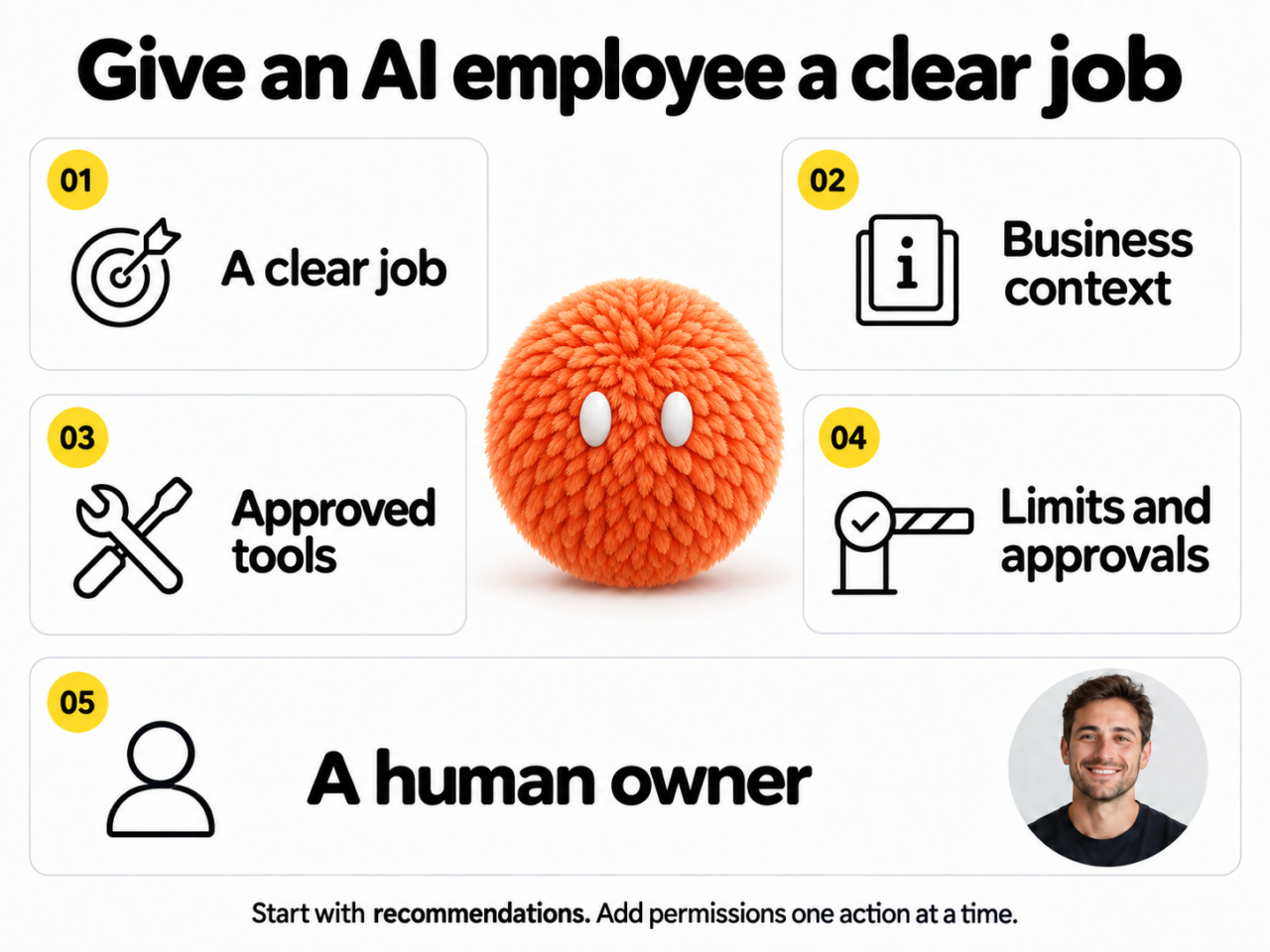
1. A clear job
“Help with marketing” is too broad. Instead, try: “Check active Meta campaigns every hour, flag unusual spend, and explain what needs review.” Define the trigger, the expected output, and what counts as a useful result.
2. Relevant business context
A general model does not automatically know your customers, brand, acquisition targets, or definition of a qualified lead. For example, it may need campaign history, CRM stages, and revenue data to interpret an apparent improvement in cost per lead. Give it only the information its job needs.
3. Approved tools
Start with access to read the necessary systems. Then separate that from permission to act. Reading an ad report and changing a budget are different powers, even when they sit in the same platform.
4. Limits and approvals
Decide which actions the agent can take, which need review, and which are off limits. For instance, it might create an internal alert on its own. A budget increase, new campaign, or sensitive public reply should go through the agreed approval process.
5. A human owner
Assign someone to review the work, correct mistakes, and maintain the brief. Also choose measures that fit the job: useful alerts, false alarms, review time, missed issues, and lead quality. A large number of completed tasks does not prove business value.
An AI employee example: checking a Meta Ads account
Consider an illustrative workflow for an agent that checks account health. The tools and permissions must support each step; this is not a claim that every product can run it.
1. Spot the change
During a scheduled check, the agent flags a campaign spending faster than planned. First, it compares the change with the team’s pacing rules.
2. Gather the evidence
Next, it checks recent budget changes, delivery, ad status, and the lead form. It compares CPM, click-through rate, and cost per lead with the account’s usual range.
3. Check lead quality
The ad platform shows cheaper leads. However, connected CRM data suggests fewer qualify or become customers. The agent checks tracking gaps and conversion delays before drawing a conclusion.
4. Form a working explanation
One ad set appears to have gained spend while attracting lower-quality leads. The agent presents this as a hypothesis, alongside supporting data and other possible causes.
5. Recommend a next step
It summarizes the evidence, the uncertainty, and the options. For example, the marketer might review targeting, inspect the offer, or pause an ad set after further checks.
6. Get a human decision
The performance marketer approves, edits, or rejects the proposal. If approved and technically supported, the agent makes the agreed change and records the action.
7. Review the outcome
Finally, it checks what happened against a defined baseline and time window. The report records both the result and any uncertainty, rather than assuming the change caused an improvement.
At first, keep this role in recommendation mode. A research agent may stop after preparing a shortlist, while a monitoring agent may only flag an issue. In each case, the process should match the job.
For more detail on this use case, read what a Meta Ads AI agent can automate.
Six AI employee roles in marketing
The following roles show where agents can support an AI workforce. Each depends on the available integrations, reliable data, and permissions you set. They are examples of work to configure, rather than promises of full automation.
Meta Ads: monitor account health
Check delivery, pacing, rejected ads, and signs of creative fatigue. Then prepare a prioritized review of changes that may affect lead quality.
Human owner: The performance marketer sets strategy, judges the evidence, and approves significant changes.
Company Brain: connect acquisition to revenue
Bring approved ad, analytics, CRM, and revenue data together. For example, identify which channels bring qualified customers and where prospects leave the acquisition funnel.
Human owner: The marketing lead tests the findings and decides where to invest.
Google Ads: review search spend
Review search terms for irrelevant queries and suggest negative keywords. Also flag questions worth testing, such as whether brand ads create extra value beyond organic traffic.
Human owner: The search specialist reviews exclusions and designs tests; a report alone cannot prove incremental value.
Customer Hunter: prepare prospect research
Find relevant public discussions, organize background information, and suggest people worth researching. Then draft a reason to reach out.
Human owner: A person checks relevance, decides whom to contact, and approves any outreach.
Reputation: spot recurring issues
Group approved brand mentions into themes. As a result, the team can see repeated concerns that might disappear inside a stream of individual alerts.
Human owner: The communications lead judges severity and chooses the response.
Social: organize the inbox
Review comments and messages in connected accounts, draft routine replies, and route unusual cases. However, complaints and sensitive topics need a person’s judgment.
Human owner: The social manager sets response rules and reviews escalations.
These roles share a pattern: the work repeats, draws on several inputs, and is easy for a busy team to postpone. To organize them across a team, see our AI marketing team structure guide.
How to increase an AI employee’s permissions
Give an agent more freedom one action at a time. First, prove that its recommendations are useful. Then test whether it can carry out a specific approved action reliably.
Stage 1: Recommend
The agent gathers evidence and proposes an action. A person reviews both the reasoning and the source data before doing anything.
Stage 2: Act after approval
Next, the agent prepares or completes the exact action a person approves. Keep a record of the approval, the change, and the result.
Stage 3: Act within tested limits
Later, selected low-risk actions may run within defined limits. Keep exceptions, unusual cases, and important decisions with a person, with a clear way to stop the workflow.
NIST’s guidance on human–AI interaction emphasizes clear human roles and responsibilities. In practice, someone must know when to review, intervene, or withdraw a permission.
When an AI employee is the wrong choice
More autonomy is not always useful. For example, a simple rule may handle a predictable notification more reliably than an agent. Likewise, a rare task may cost more to maintain than it saves.
Pause the project if the goal is unclear, the data is unreliable, or nobody can judge output quality. Also be cautious when most cases need careful judgment or an error would be hard to undo.
AI can miss context and produce a confident but incorrect explanation. Therefore, test it against real examples, including awkward cases. Review errors as well as successes before expanding the role.
How to choose an AI employee’s first job
Start with one recurring job. Before building the workflow, answer these questions with the person who does the work today:
- Does the task happen often enough to justify setup and review?
- Is the information reliable and available through approved access?
- Can an experienced marketer explain what good work looks like?
- Is there a useful next step to recommend or complete?
- Can the team measure results and catch mistakes?
- Can someone stop the process and reverse its actions?
- Who owns quality and decides when to change the brief?
A focused trial lets the team compare useful alerts, missed problems, false alarms, and review time. After that, decide whether to improve the workflow, expand it, or stop.
For a small team, this can mean broader coverage. For a larger team, it can reduce time spent collecting data and preparing handoffs. In both cases, people still own strategy, creative judgment, relationships, and results.
Nas.com’s agent and human specialist catalog offers a starting point for exploring roles. Choose the work first, then confirm the tools, permissions, and review process needed to support it.
Frequently asked questions
What is the difference between an AI agent and an AI employee?
An AI agent is technology that selects steps and uses tools to pursue a goal. An AI employee is how a business manages that technology as an ongoing role, with a brief, permissions, targets, and a human owner. Therefore, a one-off agent task does not automatically create an employee role.
Is a digital worker the same as an AI employee?
The terms can describe the same system. However, digital worker usually emphasizes the process or tasks, while AI employee emphasizes the ongoing role and its management. Neither label guarantees a particular level of autonomy.
Is an AI employee just marketing automation?
It combines automation with agent capabilities. Fixed rules handle predictable steps, while an agent can choose among approved actions when conditions vary. For example, a rule starts the daily check, and the agent decides which anomalies need closer review.
Can an AI employee make decisions on its own?
Yes, within the permissions and limits its owner sets. However, technical ability is not a reason to grant unrestricted access. Start with recommendations and add specific permissions only after testing the quality of the work.
Will AI employees replace marketing teams?
They can change tasks and roles, but they do not remove the need for accountable people. Marketers still set goals, evaluate evidence, and make creative and business decisions. The practical aim is to improve the work a team can cover while maintaining its standards.


