Quick Answer: What can a Meta Ads AI agent do?
A Meta Ads AI agent monitors Facebook and Instagram campaigns, investigates changes in performance, and recommends what to do next. With the right connections and permissions, it can also pause ads, adjust budgets, and launch tests. By linking ad spend to qualified leads and customers, it helps marketers judge business results. People still set the targets, approve major changes, and review the outcome.
A Meta Ads AI agent helps marketers manage the many small decisions that keep campaigns on track. Which creative needs a break? Is lead cost rising because the audience is tired, the website changed, or lead quality fell?
A strong performance marketer knows how to investigate. However, checking every campaign and creative takes time. AI for Meta Ads can help with that daily workload, from spotting delivery problems to preparing changes for approval.
This guide explains what a Meta Ads AI agent can automate, how marketers stay in control, and when it makes sense to build or buy one.
Why Meta Ads management needs consistent attention
Good account management starts with a routine. Each morning, compare spend, lead volume, and acquisition cost with the account’s usual range. Then investigate changes before cutting an ad or raising its budget.
Throughout the day, check delivery and the path to conversion. For example, a rejected ad can stop a campaign, while a broken form can waste clicks. Neither problem should wait for a weekly report.
Next, compare platform results with your customer relationship management system, or CRM. Meta might report 100 leads, but sales may qualify only 25. As a result, a low cost per lead can hide a high cost per customer.
Weekly creative tests and periodic account reviews matter too. Check audience overlap, customer exclusions, tracking, and how you split budgets. Also ask what changed outside the account: a website update, a competitor’s offer, or a seasonal shift.
If you need a refresher on the setup, read our guide to advertising on Instagram and Facebook.
How does a Meta Ads AI agent work?
One useful operating model combines frequent monitoring with deeper daily analysis. Hourly checks catch urgent delivery and spend issues. Meanwhile, a daily review compares results with account history and business outcomes.
The output should be a clear report and a short action list. If the agent finds a problem it cannot fix, it should explain the issue and route it to the right person.
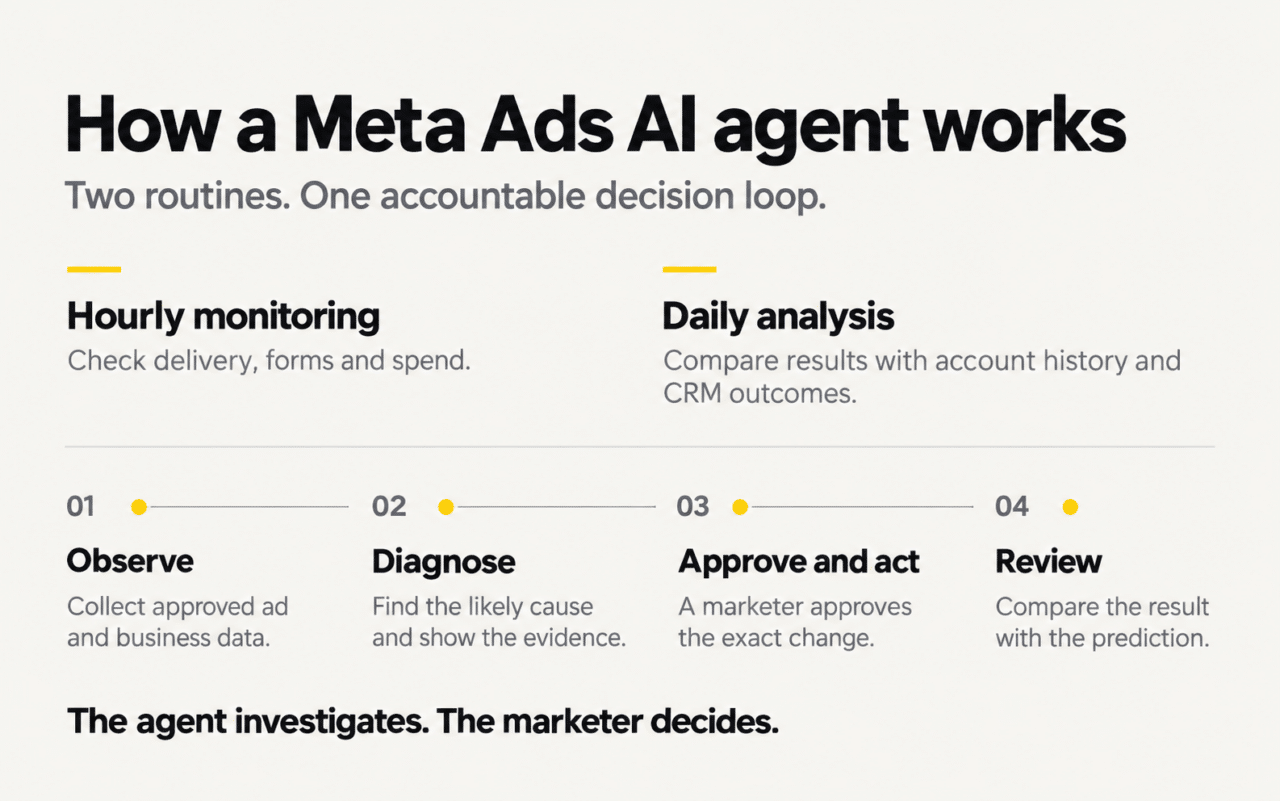
Observe: connect ad data to business results
First, the agent reads the data its integrations and permissions allow. That may include spend, reach, frequency, click-through rate (CTR), cost per thousand impressions (CPM), and cost per click (CPC).
It also needs account settings, such as objectives, audiences, budgets, and conversion events. CRM data then adds the missing business outcome: did those leads qualify, book, or buy?
The Company Brain connects approved marketing data, sales outcomes, and company knowledge so agents can improve customer acquisition. For example, targets, launch dates, and past tests help the agent interpret changes in context.
Diagnose: explain the likely cause
Next, the agent compares current results with the account’s own history. A rise in lead cost could come from tired creative, a website issue, or a change in the audience.
Because the same symptom can have several causes, the diagnosis should show its evidence and uncertainty. Recent leads also need time to qualify. Otherwise, an unfinished cohort can look worse than older leads simply because the team has had less time to contact it.
Act and review: carry out the approved change
Finally, the agent proposes an exact action. The marketer can approve it, reject it, or change the amount or timing. For example: “Approve, but increase the daily budget by only $100.”
After execution, the system should log the change and compare the result with its forecast. Start with approval for every action. Then allow selected actions to run automatically only after testing their limits.
What can a Meta Ads AI agent automate?
Facebook Ads automation can cover repetitive monitoring, analysis, and approved account changes. However, capabilities vary by product, integration, and account permissions. Check each workflow before treating it as automatic.
Monitor delivery, forms, and spend
Schedule checks for rejected ads, billing issues, unusual spend, and sudden drops in lead flow. Website and form checks require the relevant monitoring connection as well as access to ad data.
A useful alert explains the issue, the affected campaigns, and the next step. For example: “The landing-page form failed two checks. Six active ads link to this page. Review a pause while the website team repairs it.”
When everything looks healthy, the system should stay quiet. Similarly, one incident should have one owner and a tracked resolution, rather than a stream of duplicate alerts.
Investigate changes in campaign performance
“Cost per lead increased” describes a symptom. A useful analysis asks what changed, what may explain it, and what to do next.
For example, CPM may stay stable while landing-page conversion falls after a site update. In that case, changing creative may miss the real problem. Compare the relevant stages before choosing an action.
Also compare similar time periods and allow for reporting delays. A seven-day baseline can help, but seasonality and the sales cycle may require a longer view.
Connect Meta ads to qualified leads and revenue
Meta learns from the conversion signals it receives. A form submission alone does not tell it which leads become good customers. Therefore, the agent should connect campaign spend with reliable CRM outcomes where tracking allows.
Useful measures include cost per qualified lead, cost per booked appointment, cost per customer, and revenue by campaign. These measures help explain why a campaign with cheaper leads may deserve less budget.
Once the qualification definition and tracking work reliably, evaluate which permitted events you can send back to Meta. Its Conversions API for CRM overview explains this feedback approach for lead campaigns. Review consent and current platform data restrictions before configuring the connection; internal reporting does not mean every CRM field belongs in an ad platform.
Detect creative fatigue and prepare better tests
Creative fatigue often develops gradually. Frequency rises, CTR falls, and cost drifts upward. Because the ad still produces results, a team may leave it running too long.
An agent can compare that pattern with other creatives in the same environment. If several ads decline together, the issue may extend beyond one creative. If only one falls, investigate that ad more closely.
Next, turn the findings into a brief. Which hook attracted qualified leads? Which format earned clicks but few customers? Use the answers to plan the next test, with a clear success metric, enough budget, and time to assess the result.
Pause ads and adjust budgets
With the required tools and approval, a Meta Ads AI agent can pause or resume ads, change budgets, adjust supported targeting settings, or launch a test. Some systems can also support bid changes and duplicating campaigns across markets.
However, a proposed change needs an account name, exact settings, and limits. Large budget or structural changes can affect delivery and learning, so review them carefully. More activity is not the goal; on some days, the best decision is to leave the account alone.
Find structural waste
Sometimes the problem lies in the account structure. For example, budgets may be spread across too many ad sets, customer exclusions may be missing, or campaigns may optimize for an unsuitable event.
The agent can flag these patterns and draft a restructuring plan. Yet a restructure can involve creating new campaigns, checking settings, and retiring old ones. Keep major changes subject to approval, with a clear record of what happened.
Track competitors and outside events
With suitable data sources, an agent can track competitor offers, public ads, platform updates, and dates that affect demand. A long-running competitor ad can inspire a test, but its age does not prove it is profitable.
Similarly, holidays, intake deadlines, and product launches can shift demand. Company history helps the agent avoid blaming the account for a change that began elsewhere.
What should an action card include?
A recommendation should be easy to assess. Show the observation, the likely explanation, the exact change, and how the team will judge the result.
After approval, record what the agent actually changed. Then compare the outcome with the original prediction. If results differ, keep that finding in the next analysis rather than quietly discarding the forecast.
A Meta Ads AI agent customer example
In a customer example documented by Nas.com, a large diagnostic and medical testing company ran more than 400 Meta ad creatives each week. Both an internal marketing team and an external agency managed the account.
Even so, one underperforming creative continued to run for more than ten days. It still delivered activity, which made the problem less obvious among hundreds of assets.
What the agent found
The agent compared the creative’s spend and results with other active ads. It identified the underperformer, explained the evidence, and recommended a pause. As a result, the team received a specific decision to review rather than another dashboard to search.
“The challenge is going granular across hundreds of assets, not as a one-off exercise, but consistently.”
Customer CMO, in Nas.com’s documented example
What the marketing team decided
The team reviewed the diagnosis and approved the pause. That stopped further spend on the creative. Because the team approved a specific change, it could trace the decision and review what happened next.
The practical lesson is consistent coverage. Finding one weak ad is a routine decision; repeating that check across a large account is the work an agent can help maintain.
How does a Meta Ads AI agent support marketers?
A Meta Ads AI agent can take on recurring checks while people focus on decisions that need commercial judgment. Whether it replaces part of an agency’s work depends on what the agency contributes.
Where a Meta Ads AI agent adds coverage
Scheduled monitoring can make checks more consistent, including outside office hours. It can also inspect individual creatives, join approved CRM data, and retain a history of actions and tests.
However, this coverage depends on reliable data and integrations. An agent does not have perfect memory or complete knowledge simply because it runs on a schedule. Evaluate what it actually checks and what happens when access fails.
Where human expertise matters
A strong agency brings creative direction, market knowledge, specialist skills, and an outside view. Likewise, a senior marketer sets priorities, challenges assumptions, and decides what the business can afford to risk.
When automation handles routine reporting and account checks, those people can spend more time on offers, positioning, and experiments. The relationship becomes more useful when everyone can see the evidence behind a proposed change.
Give senior marketers a clear decision list
Consider a marketer responsible for five markets. Instead of pulling five reports from scratch, they could receive separate account summaries and a prioritized action list. They would still review the assumptions and approve major changes.
Over time, documented feedback can become company knowledge. For example, a rejected budget increase may reveal a capacity limit that ad data alone cannot show. Keep those rules current so the agent supports the business as it operates today.
For a wider view of the available categories, see our guide to AI marketing tools for business growth.
How do you control a Meta Ads AI agent?
Choose permissions separately for each type of action. A system may be ready to flag creative fatigue while still needing close review for budget changes.
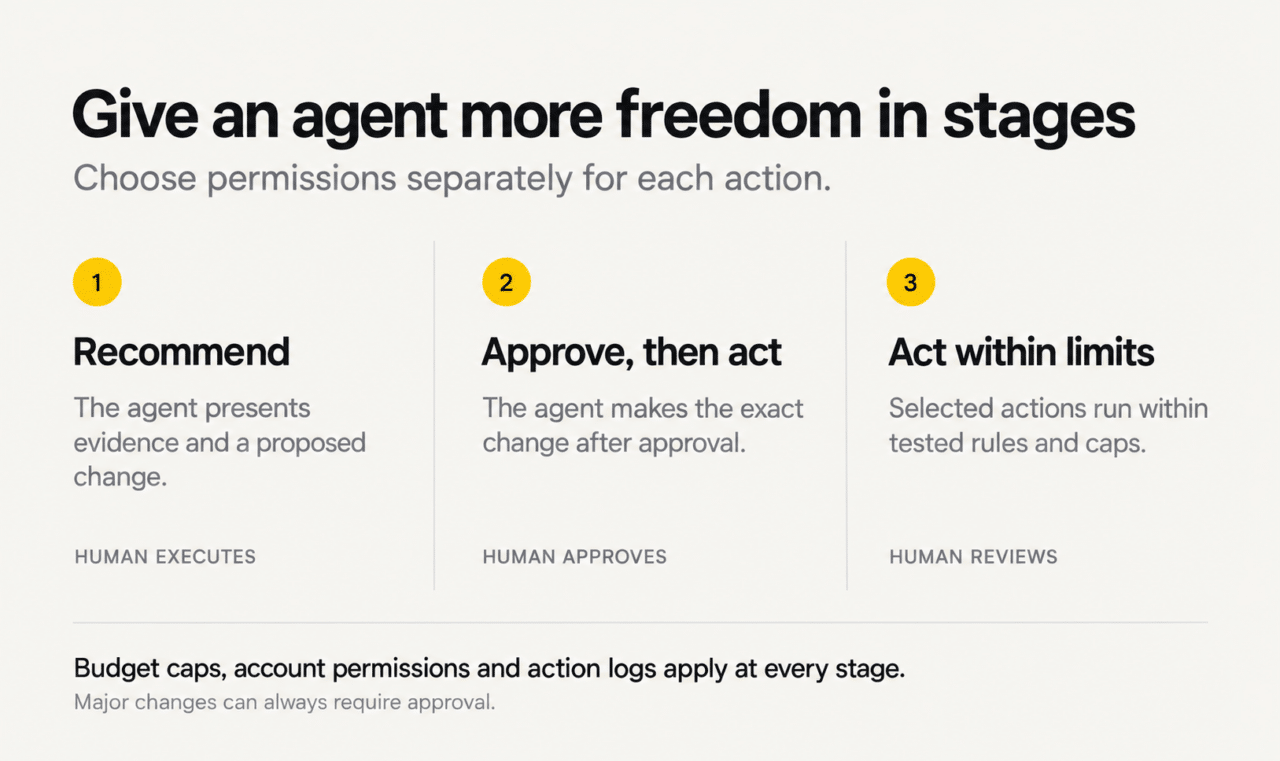
Expand permissions in stages
- Recommend: The agent presents the evidence and a proposed action. A person makes the change.
- Approve, then act: The agent executes the exact change after human approval.
- Act within limits: Selected actions run automatically within tested rules and caps.
At every stage, set budget ceilings, allowed changes, and actions that always require approval. Also keep an action log and a recovery plan for failed execution. Review targets regularly because prices, capacity, and sales cycles can change.
Can one Meta Ads AI agent manage multiple accounts?
An agent may support several brands or markets. However, each account needs its own currency, time zone, targets, and performance baseline. Every report and proposed action should name the account it concerns.
For example, do not combine dollar and euro spend into one total without an explicit conversion method. Separate reporting also makes it easier to see which market needs attention.
What a Meta Ads AI agent should not do
The agent should reveal missing data and uncertain conclusions. It should also wait for approval before a major restructure or a new conversion-feedback setup.
Similarly, the business must define an acceptable acquisition cost. That target depends on margins, conversion rates, and customer value. An agent cannot infer all of those constraints from Ads Manager alone.
How should you evaluate a Meta Ads AI agent?
Ask a vendor to demonstrate the workflow in an account like yours. Then check what happens when data is incomplete or an action fails.
- Can it connect ad spend to qualified leads and customers?
- Which urgent problems does it monitor, and how often?
- Does each recommendation show evidence and uncertainty?
- Can it execute the exact approved change and log the result?
- Can you set budget caps and account-level permissions?
- Does it separate markets, currencies, and reporting periods?
- How does it handle late conversions and missing CRM data?
- Does it compare expected results with actual outcomes?
- Can your team export its test history and action records?
A dashboard summary may be useful. However, the automation value comes from connecting analysis to a controlled action and checking whether that action helped.
How is an agent different from Claude with MCP?
Connecting Claude to an ad account can support powerful analysis. The question is what your team must build around that connection to run the whole workflow.
What the connection provides
The Model Context Protocol (MCP) is an open protocol for connecting AI applications to tools and data. For example, Claude’s MCP connector lets an application call tools from remote MCP servers, with controls over which tools it can use.
Meta also announced an open beta of its own ads AI connectors in April 2026. Those connectors let businesses connect AI agents to their ad accounts to analyze and optimize campaigns. Check current account access and supported actions before planning a rollout.
What continuous operation requires
A connection alone does not define the marketing process. You still need schedules, account baselines, CRM joins, approval rules, and tests that check whether recommendations are sound.
A one-off chat query answers a question when asked. By contrast, a scheduled workflow can check delivery and prepare a report without a daily prompt. You can build that workflow around Claude and MCP; it is not exclusive to a specialist product.
The ongoing work includes handling expired access, late data, changed CRM stages, and failed actions. It also includes marketing logic: when to wait for leads to mature, when to test a creative, and when a budget change needs review.
Therefore, compare complete workflows. A specialist agent should provide a tested operating model, usable controls, and support. An internal build should meet the same standard.
Should you build or buy a Meta Ads AI agent?
Both paths can work. The decision depends on your business advantage, team, timeline, and ability to evaluate the result.
Is ad technology part of your competitive advantage?
Building may make sense when unique data or unusual workflows are central to how you win. You gain control over the system and its roadmap.
However, standard ad-management infrastructure may not be the best use of your engineers. A retailer or services business may create more value through its offer, customer experience, and creative.
Who will own the system after launch?
An internal build needs engineering, data expertise, a senior marketer, and someone accountable for product quality. Also plan for access reviews, integration maintenance, and testing every supported action.
For example, name the person who fixes a missing daily report or a changed CRM field. If nobody owns those issues, a promising prototype can become unreliable.
How soon do you need a working process?
A mature product may offer a faster start, but it still needs setup and validation. Connect your data, define qualified leads, set targets, and test recommendations against your account.
Building offers more flexibility. In return, your team must establish those workflows and maintain them over time. Compare the full cost of ownership, including review and support.
Can you judge whether the agent is right?
A confident explanation can still be wrong. Check whether the anomaly was real, the evidence supported the diagnosis, and the proposed action was appropriate.
Then verify execution and results. Did the system make exactly the approved change? Did performance improve over a suitable review period? Keep the failed predictions as well as the wins.
Would a hybrid approach fit better?
You can buy a specialist product and customize the business context around it. For example, connect your CRM stages, acquisition targets, historical tests, and approval rules.
This approach can preserve internal strategy and proprietary data while reducing the amount of standard infrastructure your team maintains. However, confirm that the product supports the customization you need.
Start with one account and a clear review process
Begin with recommendations in one account. First, confirm the data and the definition of a qualified lead. Next, compare the agent’s findings with a marketer’s review. Then test a small set of approved actions and check the results.
Track useful outcomes: time saved, issues caught, execution accuracy, and acquisition performance. Avoid judging success by the number of alerts or changes.
The value of a Meta Ads AI agent is consistent attention tied to business results. Explore Nas.com’s marketing agents to see how an agent could fit into your team’s acquisition workflow.
Frequently asked questions
What is a Meta Ads AI agent?
A Meta Ads AI agent monitors Facebook and Instagram advertising, analyzes performance, and recommends changes. With suitable tools and permissions, it can also execute approved actions. Business data helps it judge qualified leads and customers alongside platform metrics.
Can an AI agent manage Facebook and Instagram ads?
Yes, supported workflows can include delivery checks, creative analysis, budget recommendations, and approved changes. However, access and capabilities vary. People should still set commercial targets, guide creative strategy, and approve major account changes.
Can a Meta Ads AI agent replace a media buyer?
It can automate parts of the monitoring, reporting, and execution workload. However, an AI media buyer still needs clear goals and review. Human marketers remain responsible for offers, positioning, creative direction, and decisions beyond the available data.
How can AI improve Facebook lead quality?
First, connect campaign results with reliable CRM outcomes. Then compare qualified leads and customers instead of form submissions alone. Where permitted and properly configured, conversion feedback can also help Meta learn from those business outcomes.
Is it safe to let an agent change campaigns?
Start with recommendations, then require approval for execution. Use budget caps, limited permissions, and action logs throughout. Expand automatic actions only after testing the workflow, and keep major changes subject to human review.